Ecosystem
kodeOS
kodeOS is the system your Kode Dot runs when you switch it on: the lock screen, your apps and the settings. What it does and how to get around it.
What it is
kodeOS is the system your Kode Dot runs when you switch it on, much like the home screen of a phone. It shows the time, keeps your apps in a list, holds the settings, and installs and opens the apps you get from the marketplace. Every Dot ships with it.
It has three screens:
- The lock screen. The time, the date and Kody, the Dot's character, in a small scene. Swipe left or right to change his scene. Left alone for a while, it dims to rest.
- Apps. Every app on your Dot in one list, with tabs on top to filter them. The app in focus is lit.
- Settings. Seven tiles, one icon each: Wi-Fi, Bluetooth, Screen, Battery, About, Self-test, which checks the Dot's parts one by one, and Power off.
An app takes over the whole Dot. While it runs, kodeOS steps aside. When you leave the app, the Dot comes back to Apps with that app still lit.
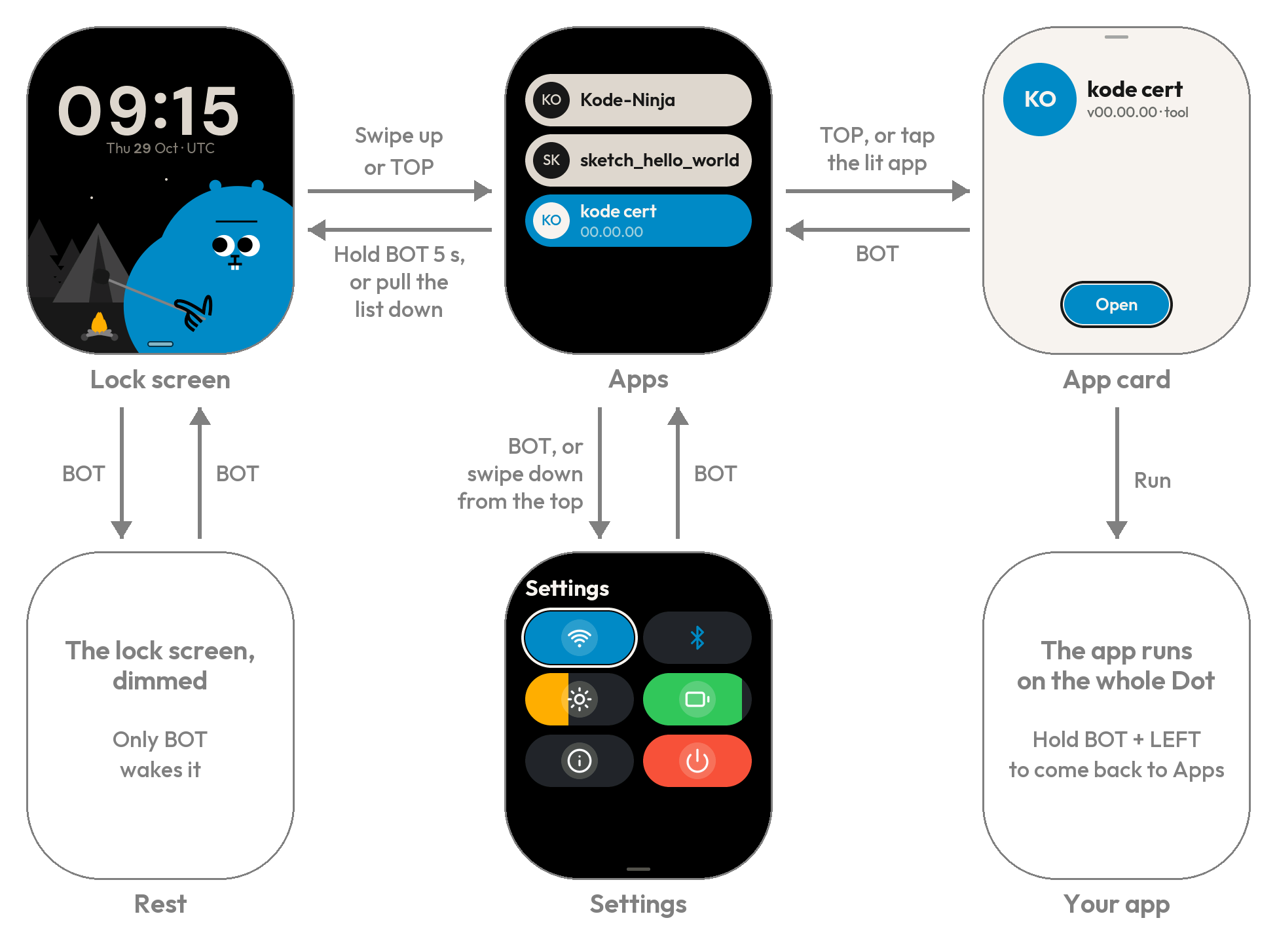
Minimal example
Open an app:
- Switch the Dot on. It starts on the lock screen. If the screen is dim, press the red BOT button to wake it.
- Swipe up, or press the blue TOP button, to unlock. Apps opens.
- Move the light to an app with the pad or your finger, then press TOP, or tap the lit app. Its card opens.
- Press Run.
- To leave the app, hold BOT and LEFT on the pad together for about one second. The Dot comes back to Apps.
Contract
| You want to | Do this |
|---|---|
| Wake a dim lock screen | Press BOT. Nothing else wakes it |
| Unlock | Swipe up, or press TOP |
| Change Kody's scene | On the lock screen, swipe left or right, or press left or right on the pad |
| Open an app | Light it, press TOP or tap it, then Run |
| Open the settings | Swipe down from the top edge of the screen, press BOT on Apps, or hold TOP |
| Go back | Press BOT |
| Go to Apps from anywhere | Hold BOT for about half a second |
| Lock the Dot now | Hold BOT until the blue ring around the screen fills, about 5 seconds, or pull the list of apps down from its top |
| Leave an app | Hold BOT and LEFT together for about one second |
| Switch the Dot off | Settings, then the Power off tile, then hold Power off until the ring fills. Press BOT or plug in a cable to switch it on again |
| Set your time zone | Settings, then About, then Time zone |
| Change when it locks by itself | Settings, then Screen, then Auto-lock. It is 2 minutes unless you change it |
| Get more apps | The marketplace (ecosystem/marketplace) or the Kode app (ecosystem/mobile-app) |
Gotchas
Verify
Switch the Dot on. The lock screen shows the time and Kody, and a swipe up opens Apps.
See also
ecosystem/marketplace: find and install appsecosystem/mobile-app: install apps from your phoneinternals/overview: how kodeOS works inside, for people who work on it