> ## Documentation Index
> Fetch the complete documentation index at: https://docs.kode.diy/llms.txt
> Use this file to discover all available pages before exploring further.

# Connectors

> Expand your Kode Dot capabilities to make your imagination the limit.

# Features

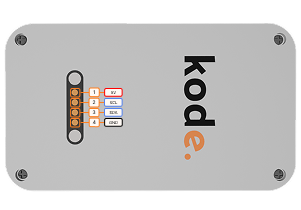
The Kode Dot has two connectors, one **20 pins on the top** and another **magnetic 4 pins on the back.**

## Top 20 pin connector
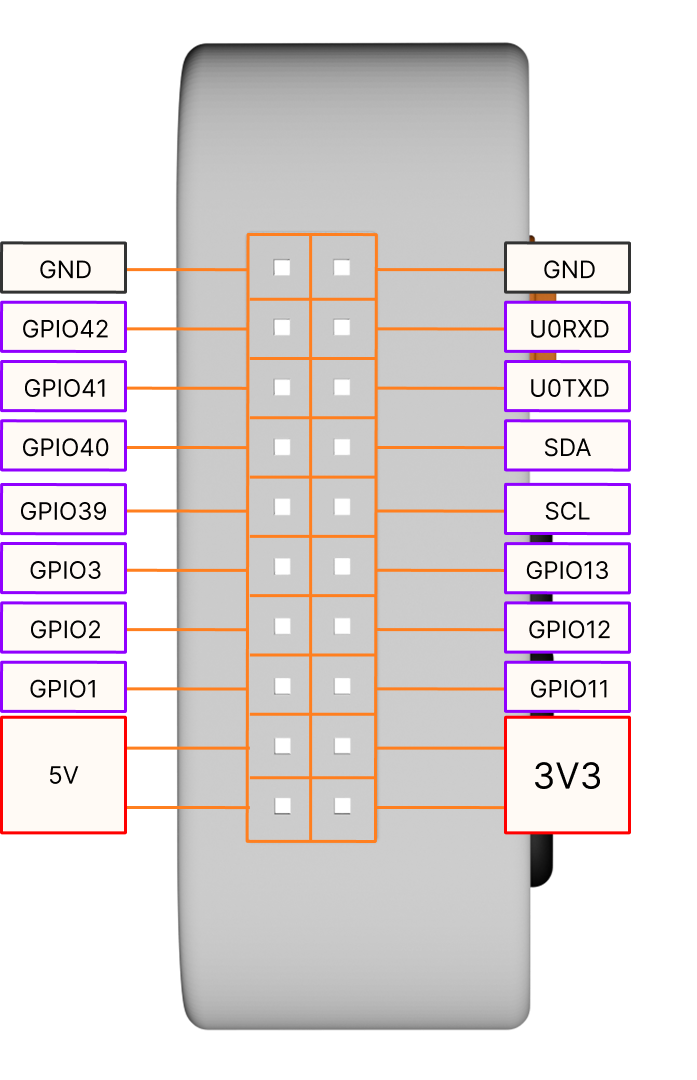
<Frame caption="Top 20 pin connector pinout">
  <img width="300" src="https://mintcdn.com/kodediy/XTX2YJaXd-8SFLrS/images/kode-dot/connectors/20pins.png?fit=max&auto=format&n=XTX2YJaXd-8SFLrS&q=85&s=13f07411d5470e66683b4ae3ce2165c4" data-path="images/kode-dot/connectors/20pins.png" />
</Frame>

## Magnetic connector on the back

<Frame caption="Magnetic connector on the back pinout">
  <img width="500" src="https://mintcdn.com/kodediy/XTX2YJaXd-8SFLrS/images/kode-dot/connectors/4pins.png?fit=max&auto=format&n=XTX2YJaXd-8SFLrS&q=85&s=6e1d3ee8f752aa89c378ea13eeccaee0" data-path="images/kode-dot/connectors/4pins.png" />
</Frame>