> ## Documentation Index
> Fetch the complete documentation index at: https://docs.kode.diy/llms.txt
> Use this file to discover all available pages before exploring further.
# Camera
> Give vision to your Kode Dot with the Camera module
**Módulo:** Standard
# Features
With this module you can **learn to capture images and record video.** It integrates a camera with an OV5640 sensor with a resolution of 5MP.
 ## Connection with the Kode Dot
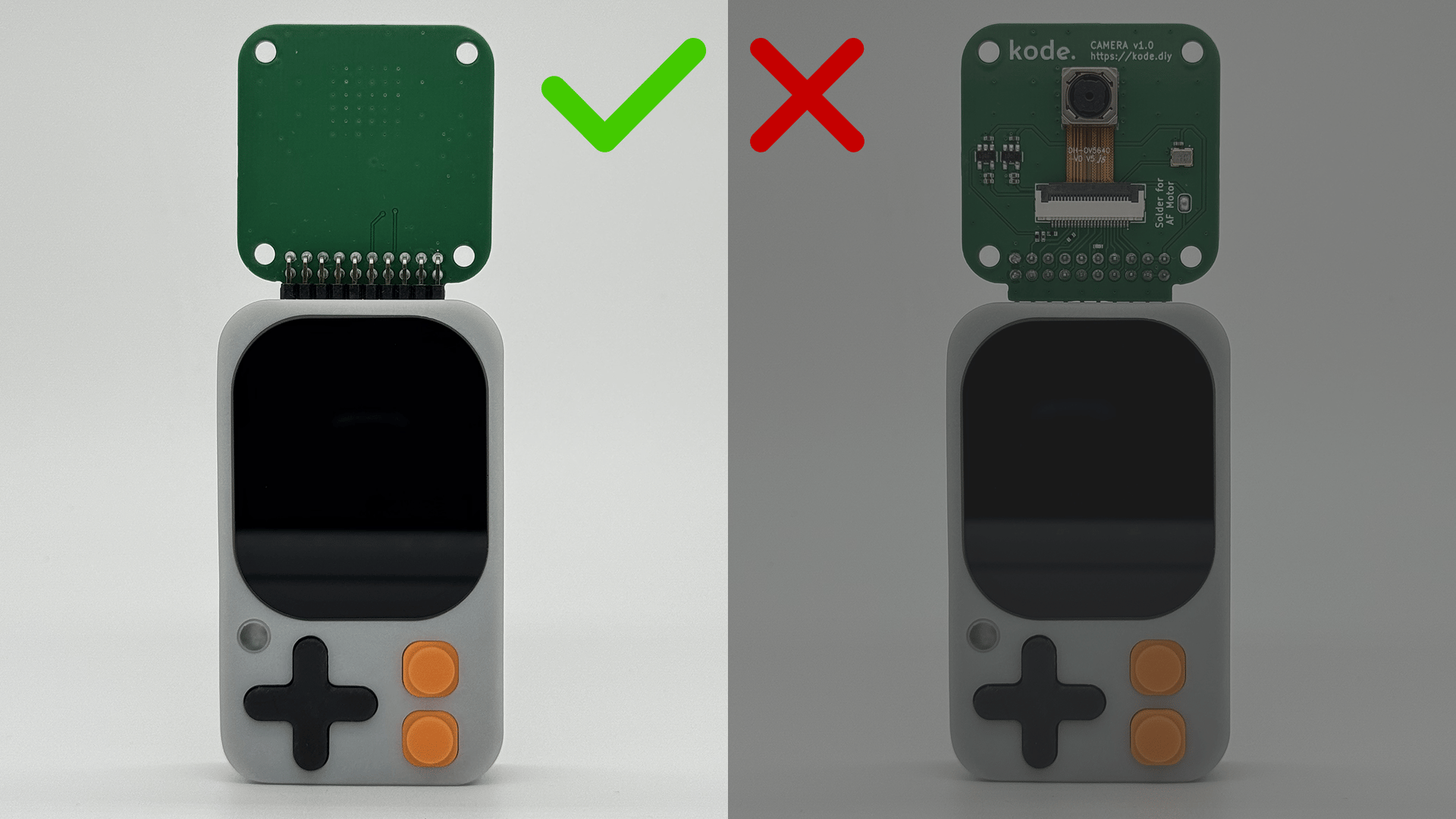 ## Connection scheme
The camera is connected to the ESP32-S3 as follows:
| Camera | ESP32-S3 |
| ------ | -------- |
| nRESET | GPIO44 |
| SCL | GPIO47 |
| SDA | GPIO48 |
| PCLK | GPIO13 |
| HREF | GPIO43 |
| VSYNC | GPIO42 |
| D2 | GPIO12 |
| D3 | GPIO11 |
| D4 | GPIO1 |
| D5 | GPIO2 |
| D6 | GPIO3 |
| D7 | GPIO39 |
| D8 | GPIO40 |
| D9 | GPIO41 |
## Example code
To test the camera we will use the example that includes **Espressif in Arduino IDE**. You can open it in File > Examples > ESP32 > Camera > CameraWebServer.
This example allows you to configure the camera and see in real time what it is capturing through a web page.
Change all the code of CameraWebServer.ino by the following and change the WiFi credentials to yours:
```cpp CameraWebServer.ino lines icon="microchip" theme={null}
/**
* ESP32-S3 Camera Web Server Example.
* Configures the camera, connects to WiFi, and serves an MJPEG stream.
* Access URL after connection: http://
*/
/* ───────── KODE | docs.kode.diy ───────── */
#include "esp_camera.h"
#include
/* ===========================
WiFi credentials
=========================== */
const char *ssid = "**********"; /* WiFi network name */
const char *password = "**********"; /* WiFi network password */
/* External function declarations (implemented elsewhere) */
void startCameraServer();
void setupLedFlash();
void setup() {
Serial.begin(115200);
Serial.setDebugOutput(true); /* Enable debug output on Serial */
Serial.println();
/* ─── Camera pin mapping and parameters ─── */
camera_config_t config;
config.ledc_channel = LEDC_CHANNEL_0;
config.ledc_timer = LEDC_TIMER_0;
config.pin_d0 = 12;
config.pin_d1 = 11;
config.pin_d2 = 1;
config.pin_d3 = 2;
config.pin_d4 = 3;
config.pin_d5 = 39;
config.pin_d6 = 40;
config.pin_d7 = 41;
config.pin_xclk = -1;
config.pin_pclk = 13;
config.pin_vsync = 42;
config.pin_href = 43;
config.pin_sccb_sda = 48;
config.pin_sccb_scl = 47;
config.pin_pwdn = -1;
config.pin_reset = 44;
config.xclk_freq_hz = 20000000; /* XCLK frequency */
config.frame_size = FRAMESIZE_UXGA; /* Initial resolution */
config.pixel_format = PIXFORMAT_JPEG; /* Format for streaming */
//config.pixel_format = PIXFORMAT_RGB565; // Option for face detection
config.grab_mode = CAMERA_GRAB_WHEN_EMPTY;
config.fb_location = CAMERA_FB_IN_PSRAM;
config.jpeg_quality = 12; /* JPEG quality (lower number = higher quality) */
config.fb_count = 1;
/* Adjust configuration if PSRAM is available */
if (config.pixel_format == PIXFORMAT_JPEG) {
if (psramFound()) {
config.jpeg_quality = 10;
config.fb_count = 2;
config.grab_mode = CAMERA_GRAB_LATEST;
} else {
/* If PSRAM is not available, reduce resolution to save RAM */
config.frame_size = FRAMESIZE_SVGA;
config.fb_location = CAMERA_FB_IN_DRAM;
}
} else {
/* Best settings for face detection/recognition */
config.frame_size = FRAMESIZE_240X240;
#if CONFIG_IDF_TARGET_ESP32S3
config.fb_count = 2;
#endif
}
#if defined(CAMERA_MODEL_ESP_EYE)
pinMode(13, INPUT_PULLUP);
pinMode(14, INPUT_PULLUP);
#endif
/* ─── Camera initialization ─── */
esp_err_t err = esp_camera_init(&config);
if (err != ESP_OK) {
Serial.printf("Camera init failed with error 0x%x", err);
return;
}
/* Access the camera sensor for extra configuration */
sensor_t *s = esp_camera_sensor_get();
/* Reduce frame size for higher initial frame rate */
if (config.pixel_format == PIXFORMAT_JPEG) {
s->set_framesize(s, FRAMESIZE_QVGA);
}
/* Flip image vertically */
s->set_vflip(s, 1);
/* ─── WiFi connection ─── */
WiFi.begin(ssid, password);
WiFi.setSleep(false); /* Prevent WiFi from entering sleep mode */
Serial.print("Connecting to WiFi");
while (WiFi.status() != WL_CONNECTED) {
delay(500);
Serial.print(".");
}
Serial.println("\nWiFi connected");
/* ─── Start the camera web server ─── */
startCameraServer();
Serial.print("Camera Ready! Access at: http://");
Serial.println(WiFi.localIP());
}
void loop() {
/* Web server handles streaming; main loop is idle */
delay(10000);
}
```
## Download examples
You can test the example codes through the Arduino IDE or the ESP-IDF IDE or download the codes in our drive:
[Example codes of the Camera module](https://drive.google.com/drive/folders/1wom3hU-bjWmbpT9DnZFzFtpL3cr-7Qzg)
## Connection scheme
The camera is connected to the ESP32-S3 as follows:
| Camera | ESP32-S3 |
| ------ | -------- |
| nRESET | GPIO44 |
| SCL | GPIO47 |
| SDA | GPIO48 |
| PCLK | GPIO13 |
| HREF | GPIO43 |
| VSYNC | GPIO42 |
| D2 | GPIO12 |
| D3 | GPIO11 |
| D4 | GPIO1 |
| D5 | GPIO2 |
| D6 | GPIO3 |
| D7 | GPIO39 |
| D8 | GPIO40 |
| D9 | GPIO41 |
## Example code
To test the camera we will use the example that includes **Espressif in Arduino IDE**. You can open it in File > Examples > ESP32 > Camera > CameraWebServer.
This example allows you to configure the camera and see in real time what it is capturing through a web page.
Change all the code of CameraWebServer.ino by the following and change the WiFi credentials to yours:
```cpp CameraWebServer.ino lines icon="microchip" theme={null}
/**
* ESP32-S3 Camera Web Server Example.
* Configures the camera, connects to WiFi, and serves an MJPEG stream.
* Access URL after connection: http://
*/
/* ───────── KODE | docs.kode.diy ───────── */
#include "esp_camera.h"
#include
/* ===========================
WiFi credentials
=========================== */
const char *ssid = "**********"; /* WiFi network name */
const char *password = "**********"; /* WiFi network password */
/* External function declarations (implemented elsewhere) */
void startCameraServer();
void setupLedFlash();
void setup() {
Serial.begin(115200);
Serial.setDebugOutput(true); /* Enable debug output on Serial */
Serial.println();
/* ─── Camera pin mapping and parameters ─── */
camera_config_t config;
config.ledc_channel = LEDC_CHANNEL_0;
config.ledc_timer = LEDC_TIMER_0;
config.pin_d0 = 12;
config.pin_d1 = 11;
config.pin_d2 = 1;
config.pin_d3 = 2;
config.pin_d4 = 3;
config.pin_d5 = 39;
config.pin_d6 = 40;
config.pin_d7 = 41;
config.pin_xclk = -1;
config.pin_pclk = 13;
config.pin_vsync = 42;
config.pin_href = 43;
config.pin_sccb_sda = 48;
config.pin_sccb_scl = 47;
config.pin_pwdn = -1;
config.pin_reset = 44;
config.xclk_freq_hz = 20000000; /* XCLK frequency */
config.frame_size = FRAMESIZE_UXGA; /* Initial resolution */
config.pixel_format = PIXFORMAT_JPEG; /* Format for streaming */
//config.pixel_format = PIXFORMAT_RGB565; // Option for face detection
config.grab_mode = CAMERA_GRAB_WHEN_EMPTY;
config.fb_location = CAMERA_FB_IN_PSRAM;
config.jpeg_quality = 12; /* JPEG quality (lower number = higher quality) */
config.fb_count = 1;
/* Adjust configuration if PSRAM is available */
if (config.pixel_format == PIXFORMAT_JPEG) {
if (psramFound()) {
config.jpeg_quality = 10;
config.fb_count = 2;
config.grab_mode = CAMERA_GRAB_LATEST;
} else {
/* If PSRAM is not available, reduce resolution to save RAM */
config.frame_size = FRAMESIZE_SVGA;
config.fb_location = CAMERA_FB_IN_DRAM;
}
} else {
/* Best settings for face detection/recognition */
config.frame_size = FRAMESIZE_240X240;
#if CONFIG_IDF_TARGET_ESP32S3
config.fb_count = 2;
#endif
}
#if defined(CAMERA_MODEL_ESP_EYE)
pinMode(13, INPUT_PULLUP);
pinMode(14, INPUT_PULLUP);
#endif
/* ─── Camera initialization ─── */
esp_err_t err = esp_camera_init(&config);
if (err != ESP_OK) {
Serial.printf("Camera init failed with error 0x%x", err);
return;
}
/* Access the camera sensor for extra configuration */
sensor_t *s = esp_camera_sensor_get();
/* Reduce frame size for higher initial frame rate */
if (config.pixel_format == PIXFORMAT_JPEG) {
s->set_framesize(s, FRAMESIZE_QVGA);
}
/* Flip image vertically */
s->set_vflip(s, 1);
/* ─── WiFi connection ─── */
WiFi.begin(ssid, password);
WiFi.setSleep(false); /* Prevent WiFi from entering sleep mode */
Serial.print("Connecting to WiFi");
while (WiFi.status() != WL_CONNECTED) {
delay(500);
Serial.print(".");
}
Serial.println("\nWiFi connected");
/* ─── Start the camera web server ─── */
startCameraServer();
Serial.print("Camera Ready! Access at: http://");
Serial.println(WiFi.localIP());
}
void loop() {
/* Web server handles streaming; main loop is idle */
delay(10000);
}
```
## Download examples
You can test the example codes through the Arduino IDE or the ESP-IDF IDE or download the codes in our drive:
[Example codes of the Camera module](https://drive.google.com/drive/folders/1wom3hU-bjWmbpT9DnZFzFtpL3cr-7Qzg)